MySQL Enterprise Backup
Only available in select Commercial Editions
MySQL Enterprise Backup provides enterprise-grade backup and recovery for MySQL. It delivers hot, online, non-blocking backups on multiple platforms including Linux, Windows, Mac & Solaris.
MySQL Enterprise Backup delivers:
- "Hot" Online Backups - Backups take place entirely online, without interrupting MySQL transactions
- High Performance - Save time with faster backup and recovery
- Incremental Backup - Backup only data that has changed since the last backup
- Partial Backup - Target particular tables or tablespaces
- Full Instance Backup - Backs up data, as well as configuration and other information to easily create a complete "replica"
- Advanced Optimistic Backup - Uses heuristics to optimize and reduce backups and shorten recovery time by assessing usage patterns
- Fast Recovery - Get servers back online and create replicated servers
- Point-in-Time Recovery (PITR) - Recover to a specific transaction
- Online "Hot" Selective Restore - bring back only selected tables into a running database
- Direct Cloud Storage Backup via S3 and Swift APIs - Backup and Restore directly to/from Oracle Storage Cloud, S3 and other Cloud Storage using AWS S3 API
- Advanced LZ4 Compression - Support highly efficient, low impact and ultra fast LZ4 compression, as well as LZMA and zlib
- AES 256 encryption - Built in 256-bit Advanced Encryption Standard (AES) encryption to secure all the sensitive backup data
- Supports MySQL TDE - Enables secure archival quality backup and restore of TDE encrypted database files and keys
- Streaming "Zero storage" Single Step Backup and Restore - Run a full or partial backup from one server and a restore to another in one streamed step without staged storage
- Backup Validation - Provides assurance checks to confirm backup integrity and quality by confirming that internal pages are valid and file checksums match.
- Exclude Tables - Exclude unnecessary tables from your Backups, saving backup time and space
- Binlog and Relay log backup - Simplifies cloning source to replica servers for HA replication
- Include Tables - Backup only required tables for better granularity and usability.
- Continuous Monitoring - Monitor the progress and disk space usage
- Selective Backup/Restore - An efficient and transportable method to backup InnoDB tables using Transportable Tablespaces
- Table renaming on restore of Transportable Tablespace (TTS) backups
- Compression - Cut costs by reducing storage requirements up to 90%
- Backup to Tape - Stream backup to tape or other media management solutions
- Partial Restore - Recover targeted tables or tablespaces
- Restore to a Separate Location - Rapidly create clones for fast replication setup
- Reduce Failures - Use a proven high quality solution from the developers of MySQL
- Multi-platform - Backup and Restore on Linux, Windows, Mac & Solaris
49x Better Performance: Backup

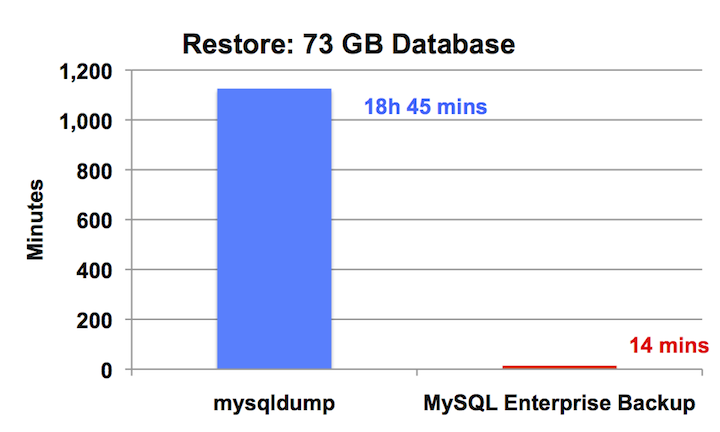
80x Better Performance: Restore